eBook Quick Rename Tool v6.0: Quick, Easy, and Metadata-Driven
 eBook Quick Rename Tool - EPUB, AZW3, MOBI and PDF file renaming software
eBook Quick Rename Tool (ex. ePub Quick Rename Tool) is a Windows application that helps you quickly rename your ebook files using their internal metadata.
The app supports EPUB, AZW3, MOBI, and PDF formats. It automatically extracts metadata such as title, author, series name, and other fields directly from the files.
With customizable renaming patterns, you can efficiently organize your ebook collection exactly the way you want.
eBook Quick Renamer works completely offline, supports batch renaming, and does not require any third-party software like Calibre or Sigil.
Key Features
- Metadata Extraction:
automatically retrieves metadata such as like title, author, series, and published date from ebook files to build a new file name.
- Multiple Format Support:
works with popular ebook formats including EPUB, AZW3, MOBI, and PDF.
- Customizable Patterns:
you can create your own naming patterns that suit your library's organizational style.
- Bulk Rename:
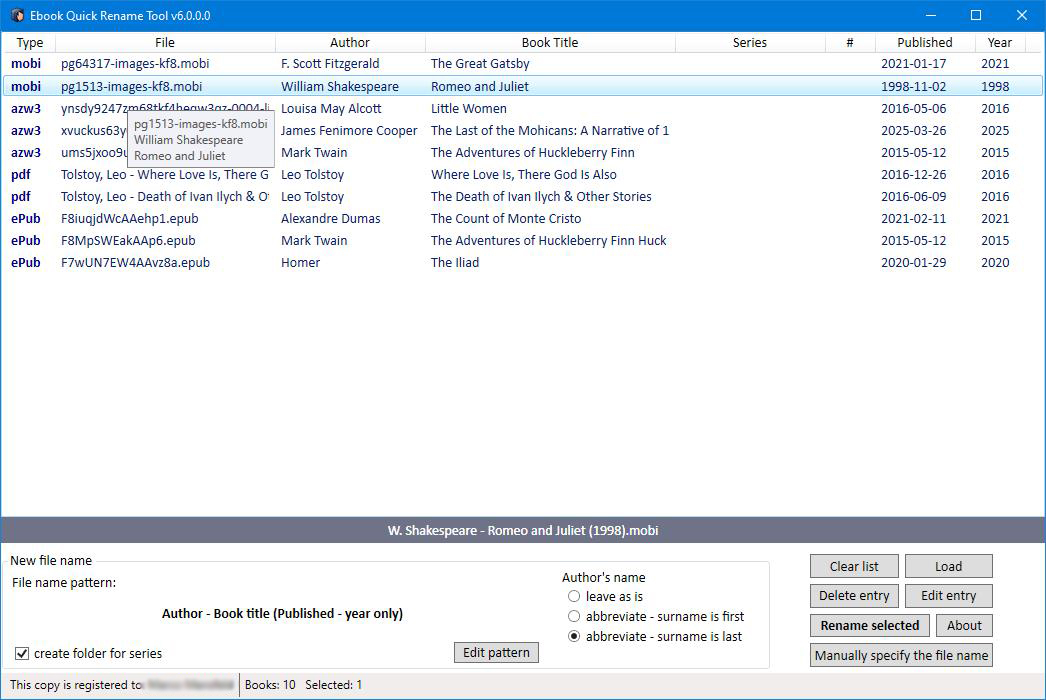
batch rename files using a simple and fast interface - just select the desired files from the list and click “Rename selected”.
- Offline work:
you don't need to upload your files anywhere; everything is done locally on your computer.
How to rename ebook files
Renaming ebook files is easy and intuitive with this program. Follow these steps to get started:
- Load ebook files
there are three ways to do this:
- drag and drop files from File Explorer into the program window.
- click the “Load” button and select files via the standard file dialog box.
- drag and drop files onto the program shortcut for instant loading.
- Select and Rename:
- choose the desired files from the list.
- if required edit the new file name pattern using the pattern editor.
- preview the new file name in the gray bar below the list.
- if necessary, edit the loaded meta data using the “Edit entry” button
- click “Rename Selected” to apply the changes.
- after renaming, if necessary, click "Manually specify the file name" button and edit file name.
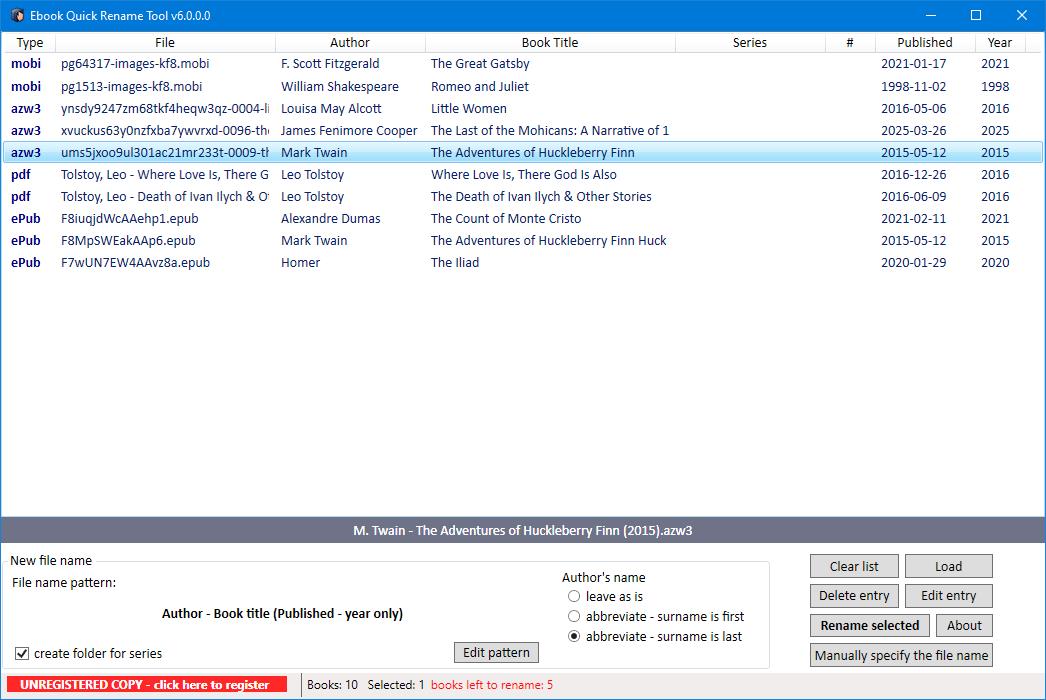 eBook Quick Rename Tool - unregistered copy screenshot
Program buttons:
- Clear list: removes all files from the list (original files remain intact).
- Load files: opens a dialog box to select and load ebook files into the program.
- Delete entry: removes selected file(s) from the list (original files remains unchanged).
- Edit entry: modify loaded metadata without altering the original file.
- About: displays program information.
- Rename selected: applies the chosen naming pattern to rename selected files.
- Manually specify the file name: use this button to make individual corrections after the program finishes its work, or to rename files manually.
Frequently Asked Questions
What is the eBook Quick Rename Tool?
The eBook Quick Rename Tool is a lightweight desktop program that renames ebook files using their internal metadata—such as title, author, and series—to create clean, meaningful filenames.
What file formats does it support?
The tool can read metadata and rename EPUB, AZW3, MOBI, and PDF files.
How does the tool extract metadata?
The tool reads metadata directly from inside each file and automatically retrieves fields like title, author, published date and series name to build the new filename pattern.
Can I customize the naming pattern?
Yes. You can drag and drop metadata elements to build your own naming pattern and reorder them to match your preferred library organization style.
Which metadata is available to build naming patterns?
You can include these elements in the pattern:
- Author;
- Book title;
- Series name (if applicable);
- Series number (if applicable);
- Published date;
Does it support batch renaming?
Yes. You can load multiple eBook files and rename them all at once using the Rename Selected button.
Does the tool work offline?
Yes. All processing happens locally on your computer, ensuring privacy and security.
Can I edit metadata before renaming?
Yes. You can edit the loaded metadata before renaming. This does not modify the original eBook file — only the resulting filename.
Will the tool modify or delete my original eBook files?
No. The tool only renames files. Removing entries from the list or clearing the list does not delete or alter your original files.
How do I load files into the program?
You can load files by dragging and dropping them into the program window, using the Load button, or dragging files onto the program shortcut.
Is the program free?
The tool is shareware. The unregistered version allows renaming up to 10 files. Purchasing a license unlocks unlimited renaming and includes free lifetime updates.
How do I purchase a license?
You can purchase a license using the link provided on the product page under the Registration section.
What operating systems are supported?
The program works on Windows 10/11.
Screenshots
Comparison with Calibre E-Book Manager
| Feature |
eBook Quick Rename Tool |
Calibre |
| Primary purpose |
Fast, automated renaming of ePub, azw3, mobi and pdf files |
Complete ebook management suite |
| Metadata reading |
Reads embedded metadata to build filenames |
Reads, edits, downloads, and rewrites metadata |
| Batch renaming |
Yes, optimized for bulk operations |
Possible, but not the main workflow |
| Format support |
EPUB, MOBI, AZW3, and PDF |
EPUB, MOBI, AZW3, PDF, CBZ, and many more |
| Library management |
None |
Full library with tags, series, covers, formats |
| Conversion tools |
No |
Extensive format conversion |
| User interface |
Minimal, task‑focused |
Powerful but complex and sometimes overwhelming |
| Automation |
Very high for renaming |
High for metadata tasks, lower for renaming workflows |
| Learning curve |
Very low |
Moderate to high |
| Ideal user |
Someone who wants clean filenames fast |
Someone managing a full ebook collection |
Registration
This program is shareware, so unless you purchase a license, an unregistered copy of the program allows only 10 files to be renamed.
To purchase a license please follow this link: purchase a license
Once you purchase a license, you get free lifetime updates of this program.